This page contains affiliate links. If you purchase through them we may earn a small commission at no extra cost to you. Learn more
Node-RED Solar Automation: Beginner's Guide

Node-RED is a visual programming tool that lets you build automations by connecting blocks (nodes) together. For solar owners who find Home Assistant's YAML automations intimidating, Node-RED offers a more intuitive way to automate energy management.
What Is Node-RED?
Node-RED is a flow-based programming tool originally created by IBM. You build automations by dragging "nodes" (functional blocks) onto a canvas and connecting them with wires. Data flows from left to right through the nodes.
For example, a simple solar automation flow might look like:
[Solar Power Sensor] → [Compare: > 2000W?] → [Yes: Turn On Immersion Heater]
Each block is visual and configurable by clicking on it. No YAML, no scripting, no command line.
Why Node-RED for Solar?
Visual Logic
Complex conditional logic that's confusing in YAML becomes clear when you can see the flow. "If solar generation is above 2kW AND battery is above 80% AND the hot water cylinder is below 50°C, then turn on the immersion heater" — in Node-RED, this is a visible chain of connected nodes.
Rapid Prototyping
You can build, test, and modify automations in minutes. The "deploy" button makes changes live instantly. Trial and error is fast and reversible.
Custom Logic
Some automations don't fit neatly into Home Assistant's automation framework. Node-RED handles complex conditional logic, timers, counters, and state machines more naturally.
Good for Learners
If you've never programmed anything, Node-RED's visual approach is less intimidating than YAML or Python. Many solar owners start with Node-RED and never need to go further.
Setting Up Node-RED
As a Home Assistant Add-on (Recommended)
- Install the "Node-RED" add-on from the Home Assistant add-on store
- Install the "Node-RED Companion" integration via HACS
- Start Node-RED — it opens in a browser tab
- Home Assistant entities are automatically available as nodes
Standalone
Node-RED can run independently on a Raspberry Pi or any computer. You'd connect to Home Assistant via its REST API or MQTT. This works but is more complex to set up.

EcoFlow Delta Pro 3.6kWh Portable Power Station
£1,5003.6
3.4
LFP
3500
 View on EcoFlow UK
Affiliate link — we may earn a small commission at no extra cost to you
Solar Automation Examples
1. Solar Surplus Load Switching
Turn on a smart plug when solar surplus exceeds a threshold:
Flow:
- HA sensor node: Monitors
sensor.solar_power(current generation) - HA sensor node: Monitors
sensor.grid_power(negative = exporting) - Function node: Calculates surplus (generation minus consumption)
- Switch node: If surplus > 1500W, output 1; else output 2
- HA service node (output 1): Turn on smart plug
- HA service node (output 2): Turn off smart plug
- Delay node: Prevent rapid switching (wait 5 minutes between changes)
The delay node is important — without it, passing clouds cause the smart plug to flicker on and off constantly.
2. Battery SOC Alerts
Get notified when your battery reaches certain levels:
Flow:
- HA sensor node: Monitors
sensor.battery_soc - Switch node: Routes based on value (above 90%, below 20%, below 10%)
- Notification node (>90%): "Battery full — excess solar being exported"
- Notification node (under 20%): "Battery low — consider reducing usage"
- Notification node (under 10%): "Battery nearly empty — grid import starting"
3. Cheap Rate Battery Charging
Charge the battery when Octopus Agile drops below a threshold:
Flow:
- HA sensor node: Monitors
sensor.octopus_current_rate - Switch node: If rate < 8p/kWh
- HA sensor node: Check battery SOC
- Switch node: If SOC < 80%
- HA service node: Set battery to charge mode via GivTCP
- Delay node: Check again in 30 minutes
Use Predbat for Battery Optimisation Instead
While you can build battery charging automations in Node-RED, Predbat does this much more intelligently — it considers pricing across the full 48-hour window, solar forecasts, and consumption patterns. Use Node-RED for load switching and notifications; use Predbat for battery scheduling.
4. Daily Solar Summary
Send a daily summary of solar performance:
Flow:
- Inject node: Trigger at 9pm daily
- HA sensor nodes: Read today's generation, import, export, self-consumption
- Function node: Format into a readable message
- Notification node: Send via phone notification, email, or Telegram
Example output: "Today: Generated 18.3 kWh, self-consumed 12.1 kWh (66%), exported 6.2 kWh, imported 4.8 kWh. Saved £4.36."
5. EV Charging Based on Solar
Start EV charging when solar surplus is sufficient and stop when it drops:
Flow:
- HA sensor node: Monitor solar surplus
- Switch node: If surplus > 1400W (minimum for 6A EV charging)
- Delay node: Sustained for 5 minutes (avoid cloud-gap switching)
- HA service node: Start EV charging via Zappi or OCPP integration
- Separate flow: Stop charging when surplus drops below 1000W for 10 minutes
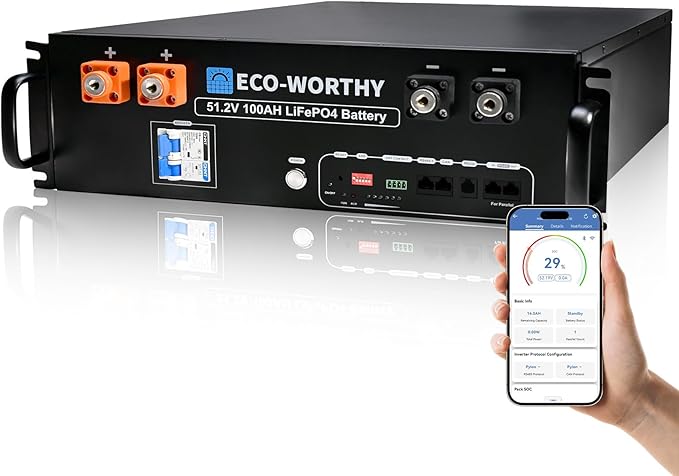
ECO-WORTHY 5.12kWh LiFePO4 Battery Module
£7005.12
4.9
LFP
4000
Affiliate link — we may earn a small commission at no extra cost to you
Node-RED vs Home Assistant Automations
| Feature | Node-RED | HA Automations |
|---|---|---|
| Interface | Visual drag-and-drop | YAML or UI editor |
| Complex logic | Excellent | Awkward for multi-condition flows |
| Simple automations | Slightly over-engineered | Quick and easy |
| Learning curve | Gentle for visual thinkers | Steeper (YAML syntax) |
| Performance | Good | Native (slightly faster) |
| Community support | Large | Very large |
| Debugging | Visual flow tracing | Log-based |
Many users run both: Home Assistant automations for simple triggers ("turn on light at sunset") and Node-RED for complex energy management logic.
Tips for Solar Flows
Add Hysteresis
Don't switch loads on at 2000W and off at 1999W — you'll get rapid switching. Instead, turn on at 2000W and off at 1500W (a 500W band). This is called hysteresis and prevents oscillation.
Use Delay Nodes Generously
Solar generation fluctuates with passing clouds. Wait 3–5 minutes before acting on any generation change. This smooths out short-term variations.
Log Everything
Add debug nodes and write data to InfluxDB or Home Assistant's recorder. Historical data helps you refine automations over time.
Test Before Deploying
Node-RED has an "inject" node that lets you simulate inputs. Test your flows with fake data before connecting them to real devices.
Don't Conflict with Predbat
If you're running Predbat for battery management, don't also build Node-RED flows that control the battery. Two systems sending conflicting commands to the inverter will cause unpredictable behaviour. Use Node-RED for non-battery automations (load switching, notifications, monitoring) and Predbat for battery optimisation.
Node-RED is a powerful tool for solar automation that makes complex logic accessible. Start with one simple flow (like a daily summary notification), get comfortable with the interface, and build from there.
For the broader Home Assistant setup, see our Home Assistant guide.
Share this article
The UK's fastest boiler installation service — from quote to fitted in as little as 24 hours. Award-winning, Trustpilot rated, with no pushy salesmen.
Affiliate link — we may earn a small commission at no extra cost to you
Stay informed
Get free solar updates direct to your inbox
Related reading
Home Assistant for Solar: Monitoring and Automation
Use Home Assistant to monitor and automate your solar panel system. Setup guide for UK solar owners — dashboards, automations, and energy management.

Octopus Energy API: Automating Your Solar Setup
Use the Octopus Energy API to automate your solar and battery system. Access real-time pricing, consumption data, and account information for smarter energy management.
GivEnergy API and GivTCP: Local Control for Your Battery
Control your GivEnergy battery locally with GivTCP and the GivEnergy API. Set up Home Assistant integration for real-time monitoring and automated scheduling.


Switch to Octopus Energy
Get 50 credit when you switch. We get 50 too — win-win.
What does this mean for YOUR home?
Design your perfect solar setup in under 3 minutes. Free, no sign-up required.
Build Your Solar System